
October 30, 2026 •Merill Fernando
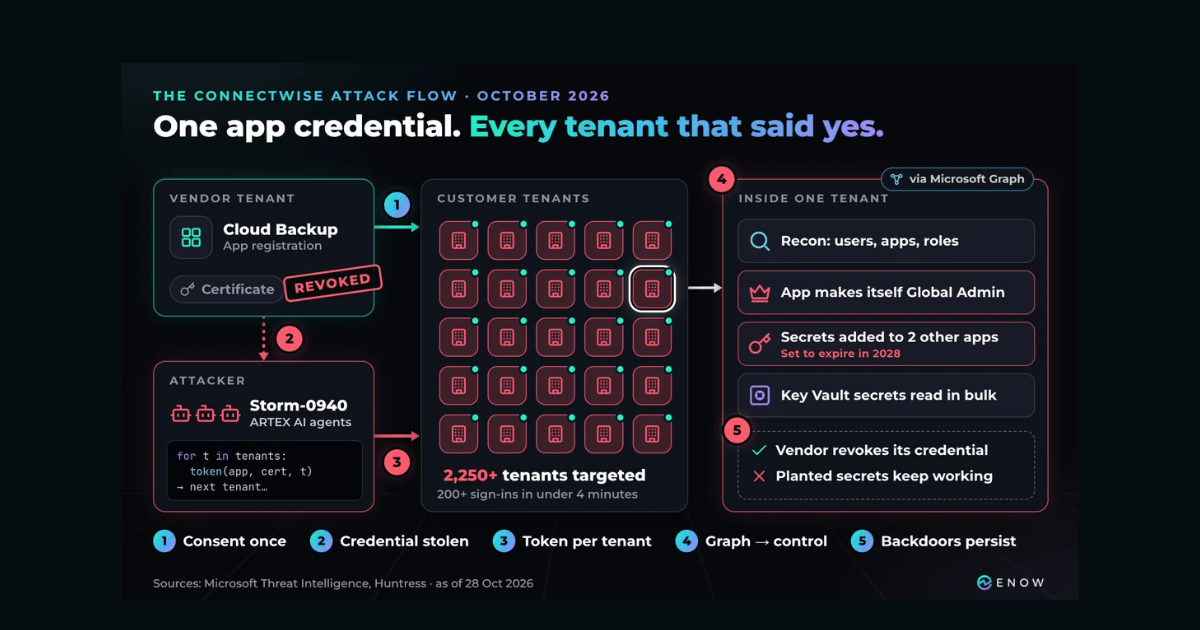
On October 15th, an attacker signed in to more than 170 Microsoft 365 tenants without phishing a single user. They used the credentials of a backup app those tenants had approved, so there was no password or MFA prompt, and Conditional Access was never evaluated.
Nicolas Blank has already covered what happened in the ConnectWise Cloud Backup breach and why so many apps go unreviewed. Since then, Microsoft has assessed that a China-aligned actor it tracks as Storm-0940 was behind it, and that the actor used ARTEX, an open-source agentic AI penetration testing framework, to run the attack at machine speed.
This post walks through the attack step by step and explains why the controls built for users never came into play. The second half has five checks you can run in your own tenant today.
The attack flow, step by step
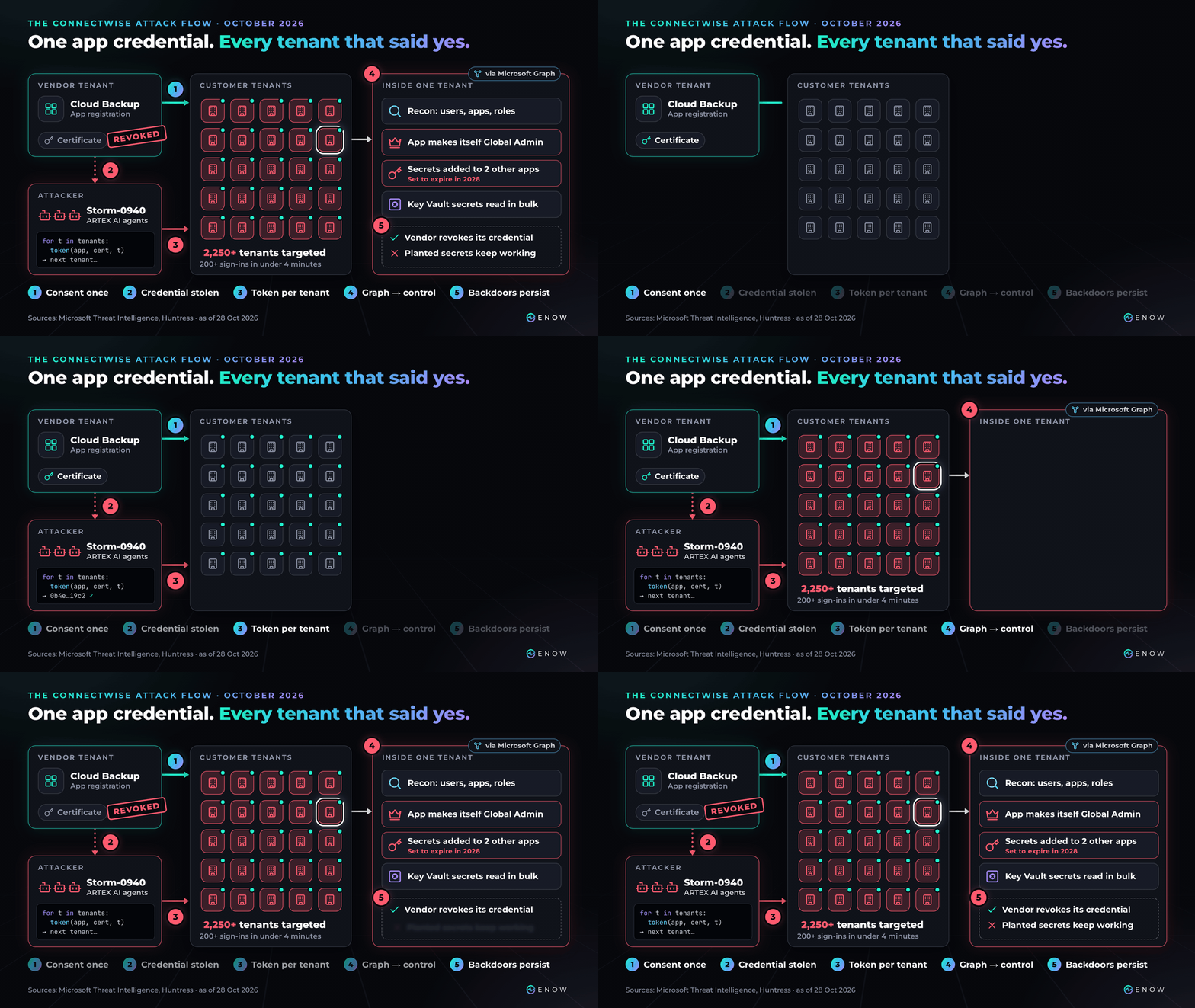
Figure 1. The ConnectWise attack flow.
Step 1: Trust is granted once, and it stays
A multitenant app like ConnectWise Cloud Backup (formerly SkyKick Backup) lives in two places. The app registration and its credential sit in the vendor's tenant, where you can't see or rotate them. The service principal, which you know as the enterprise app, is created in your tenant when an admin consents, and it holds the permissions you granted.
A backup app uses application permissions, so it acts as itself across the whole tenant with nobody signed in. That usually means read and write access to mail, files and Teams chats, and in its first statement on X, Microsoft also named Directory.ReadWrite.All. None of this was a misconfiguration. It's what a backup product needs, which also made it a valuable target.
Step 2: The vendor's credential is taken
How the credential was taken hasn't been made public, though Microsoft says it wasn't through a compromise of, or a vulnerability in, its own systems. The attacker gained control of several ConnectWise app identities, including Cloud Backup. Nobody has confirmed the credential type, but ConnectWise revoked certificates to cut it off and the sign-in logs record a clientAssertion, both of which point to a certificate rather than a secret.
Step 3: One token request per tenant
The client credentials flow takes an app ID, a credential and a tenant ID. Change the tenant ID and you get a token for the next customer.
On the morning of 15 October, the backup app did exactly that from a VPS at a hosting provider (144.172.64[.]128), requesting one token per tenant in tenant ID order between about 06:13 and 08:46 UTC. Just before that, Huntress saw about 100 requests fail within ten seconds, which looks like a script working through a list.
| Source | What they counted |
|---|---|
| Huntress (16–17 Oct) | 173 tenants with confirmed unauthorized sign-ins |
| Microsoft (21 Oct) | Attempts against more than 2,250 tenants; over 200 sign-ins in under four minutes |
Microsoft says most of the targeting failed, and a sign-in doesn't on its own prove that data was taken. Each successful one did give the attacker a token with every permission that tenant had granted the app. A slower sweep at policy and critical minerals organizations mostly failed, because most didn't use ConnectWise. If the service principal isn't in your tenant, the stolen credential gets nothing.
Step 4: Graph turns access into control
With a token in hand, the attacker used Microsoft Graph for reconnaissance and to change app credentials and roles. Huntress documented one tenant in detail:
- The ConnectWise Cloud Management – MS Teams app added itself to the Global Administrator role.
- Minutes later, a script added client secrets, valid until 2028, to two other apps registered in the tenant. The apps it picked looked random.
Microsoft also reported attempts to add credentials to service principals in target tenants, and bulk reads of secrets from Azure Key Vaults. No vulnerability was needed. An app with RoleManagement.ReadWrite.Directory can make itself an administrator, and an administrator can add credentials to any other app and take on its permissions.
Step 5: The backdoor outlives the fix
ConnectWise has disabled seven app identities and revoked their certificates, which cuts off the stolen credential. It doesn't remove anything created inside your tenant, though. A secret added to another app in your tenant keeps working after the vendor's fix, and finding it is up to you. Tokens that were already issued also stay valid until they expire.
| When (UTC) | What happened |
|---|---|
| 10–14 Oct | Password spray from the same IP range; no successful sign-ins |
| 15 Oct, ~03:45 | In one tenant, the Teams app makes itself Global Administrator and secrets are added to two other apps |
| 15 Oct, ~06:13–08:46 | The backup app requests tokens for tenant after tenant |
| 17 Oct | ConnectWise disables seven app identities and revokes certificates |
| 21 Oct | Microsoft attributes the activity to Storm-0940 using ARTEX |
| 27 Oct | ConnectWise is waiting on a third-party validation before it restores service |
Why MFA and Conditional Access never saw it
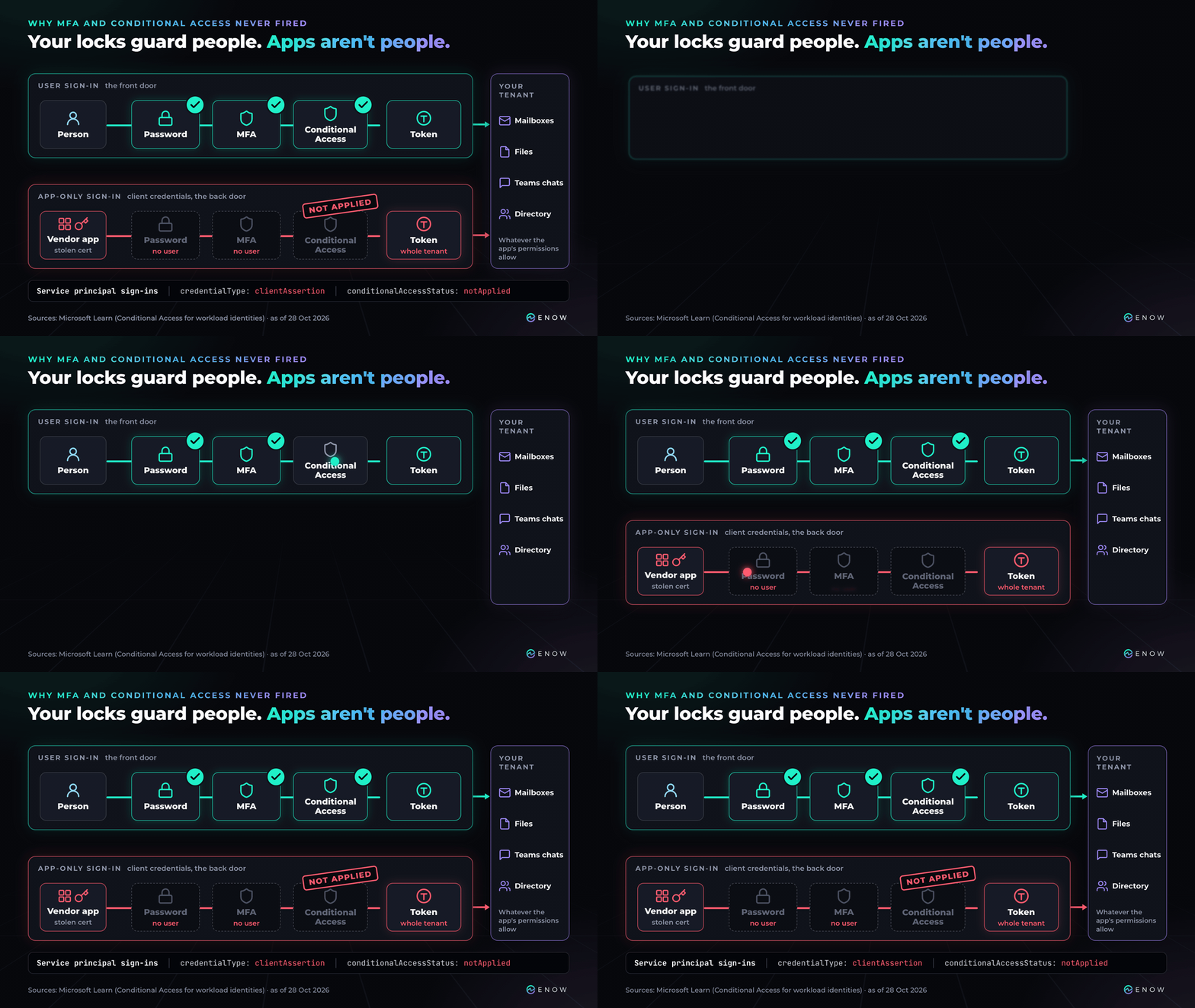
Figure 2. User sign-ins and app-only sign-ins.
Most identity security work has gone into protecting user sign-ins. The client credentials flow has no user, so none of it applied:
- There was nobody to prompt for MFA, and Conditional Access policies for users don't evaluate app-only sign-ins. The sign-in log shows Conditional Access status
notApplied. - Conditional Access for workload identities only covers single-tenant apps registered in your own tenant, so you can't use it on a vendor's multitenant app.
- These sign-ins are on the Service principal sign-ins tab rather than User sign-ins, which makes them easy to miss.
- The audit log records changes, not reads. Graph reads only show up in the Microsoft Graph activity logs, and only if you turned them on beforehand.
Entra ID Protection does flag risk on multitenant apps, and Microsoft Defender has alerts such as Application self-assigned Global Administrator role. Microsoft's analysis also includes hunting queries for Defender XDR and Sentinel. These all fire after the token has been issued, though.
What ARTEX changed: the same playbook at machine speed
Storm-0940 has been adding credentials to OAuth apps and reading mail through Graph for years. What Microsoft says is new is that AI agents did the work. ARTEX runs a team of LLM agents through a penetration test with very little human input, and as they work they build a graph of the assets and weaknesses they find. The password spray before the app abuse peaked at more than 2,900 failed sign-ins a minute, and in several cases Microsoft measured less than three hours from first targeting to privileged access.
Huntress, which saw the activity in tenants it monitors, can't verify Microsoft's attribution independently. On its own data it puts its confidence that an LLM was involved at low to medium, or medium to high with Microsoft's assessment added, and its best guess is an AI agent running scripted tools with a person stepping in now and then. How the credential was stolen and whether any data was read are still unknown. None of the checks below depend on those answers.
What it does change is how much time you have. When attackers worked by hand, a vendor's breach notice usually gave you hours or days. With agents, your tenant may already have been visited by the time the advisory is out. Every affected admin needed answers to the same four questions:
- Do we have this app?
- What can it do in our tenant?
- Who approved it, and who owns it now?
- Has it changed anything?
The next incident will involve a different app, but the questions will be the same.
How much app governance risk is sitting in your Entra ID tenant? Find out in a free, read-only AppGov Score scan.
Where native tools leave operational gaps
Microsoft gives you the raw data. The gaps are in keeping track of hundreds or thousands of apps over time.
Visibility. No portal page answers "which apps could take over this tenant?". Permissions are on each app's Permissions blade, and credentials added to a service principal don't appear in the portal at all.
Risk. A delegated User.Read grant and an application RoleManagement.ReadWrite.Directory grant each count as one permission, and the portal won't rank them for you.
Ownership. Third-party apps usually have no owner in your tenant, and the admin who consented in 2019 may have left. In an incident there's nobody to ask what breaks if you turn the app off.
Remediation. You can't rotate a vendor's credential, and disabling a backup app means stopping backups mid-incident.
Keeping it current. Apps gain permissions and credentials after the day they're approved, so last quarter's review describes last quarter's tenant.
Five things Entra ID admins should check today
Everything below is read-only and uses the Microsoft Graph PowerShell SDK. Install the full Microsoft.Graph module, or Microsoft.Graph.Applications, Microsoft.Graph.Identity.Governance and Microsoft.Graph.Reports. Global Reader is enough once an admin has consented to the scopes in the first snippet. I ran each snippet against my lab tenant before publishing.
1. Which apps could take over your tenant?
This lists apps holding Microsoft Graph application permissions that can change your directory or reach all of your data:
Connect-MgGraph -Scopes Application.Read.All, Directory.Read.All, AuditLog.Read.All

$graph = Get-MgServicePrincipal -Filter "appId eq '00000003-0000-0000-c000-000000000000'"
$role  = @{}; $graph.AppRoles | ForEach-Object { $role[$_.Id] = $_.Value }
$risky = 'RoleManagement.ReadWrite.Directory', 'AppRoleAssignment.ReadWrite.All', 'Application.ReadWrite.All',
         'Directory.ReadWrite.All', 'Mail.ReadWrite', 'Files.ReadWrite.All', 'Sites.FullControl.All'

Get-MgServicePrincipalAppRoleAssignedTo -ServicePrincipalId $graph.Id -All |
    Where-Object { $role[$_.AppRoleId] -in $risky } |
    Select-Object PrincipalDisplayName, @{ n = 'Permission'; e = { $role[$_.AppRoleId] } }
For Exchange Online's full_access_as_app, swap in app ID 00000002-0000-0ff1-ce00-000000000000. Apps can also hold admin roles directly, as the Teams app gave itself in Step 4:
$roleName = @{}; Get-MgRoleManagementDirectoryRoleDefinition -All | ForEach-Object { $roleName[$_.Id] = $_.DisplayName }

Get-MgRoleManagementDirectoryRoleAssignment -All -ExpandProperty principal |
    Where-Object { $_.Principal.AdditionalProperties.'@odata.type' -eq '#microsoft.graph.servicePrincipal' } |
    Select-Object @{ n = 'App'; e = { $_.Principal.AdditionalProperties.displayName } },
        @{ n = 'Role'; e = { $roleName[$_.RoleDefinitionId] } }
Each app you find should have a clear business reason and a named owner.
2. Whose credential unlocks each of them?
If an app was registered in another organization's tenant, that organization holds and protects its credential. This lists those apps, leaving out Microsoft's:
$tenantId  = (Get-MgContext).TenantId
$microsoft = 'f8cdef31-a31e-4b4a-93e4-5f571e91255a', '72f988bf-86f1-41af-91ab-2d7cd011db47',
             '33e01921-4d64-4f8c-a055-5bdaffd5e33d', 'cdc5aeea-15c5-4db6-b079-fcadd2505dc2'

Get-MgServicePrincipal -All -Property displayName, appId, appOwnerOrganizationId |
    Where-Object { $_.AppOwnerOrganizationId -and $_.AppOwnerOrganizationId -notin @($tenantId) + $microsoft } |
    Select-Object DisplayName, AppId, AppOwnerOrganizationId
If a Microsoft app still shows up, check its verified publisher and add its tenant ID to the list.
For apps in both lists, ask the vendor whether they use a separate app per customer and whether its credential is a certificate or a federated credential. Also ask whether they've turned on app instance property lock, which stops anyone adding credentials to their app's service principal in your tenant. You can't see a vendor's setting, but you can check the multitenant apps you publish yourself:
Get-MgApplication -All -Property displayName, appId, signInAudience, servicePrincipalLockConfiguration |
    Where-Object { $_.SignInAudience -ne 'AzureADMyOrg' -and -not $_.ServicePrincipalLockConfiguration.IsEnabled } |
    Select-Object DisplayName, AppId, SignInAudience
In my lab tenant, 9 of my 15 multitenant apps didn't have it.
3. Are there credentials where they shouldn't be?
A third-party app's credential belongs in the vendor's tenant, so one on its service principal in your tenant is unusual. This reuses $tenantId and $microsoft from check 2:
Get-MgServicePrincipal -All -Property displayName, appId, appOwnerOrganizationId, passwordCredentials, keyCredentials |
    Where-Object { $_.AppOwnerOrganizationId -and $_.AppOwnerOrganizationId -notin @($tenantId) + $microsoft -and
                   ($_.PasswordCredentials -or $_.KeyCredentials) } |
    Select-Object DisplayName, AppId, @{ n = 'Secrets'; e = { $_.PasswordCredentials.Count } },
        @{ n = 'Certificates'; e = { $_.KeyCredentials.Count } }
In my lab tenant this returns nothing, which is what you want to see.
The secrets Huntress found were on apps registered in the tenant itself, where credentials are normal, so look for new ones. This lists credentials added in the last 30 days to your own app registrations and service principals:
$since = (Get-Date).AddDays(-30)
$mine  = @{
    'App registration'  = Get-MgApplication -All -Property displayName, passwordCredentials, keyCredentials
    'Service principal' = Get-MgServicePrincipal -All -Property displayName, appOwnerOrganizationId, passwordCredentials, keyCredentials |
                              Where-Object { $_.AppOwnerOrganizationId -eq $tenantId }
}

foreach ($where in $mine.Keys) {
    foreach ($obj in $mine[$where]) {
        @($obj.PasswordCredentials) + @($obj.KeyCredentials) | Where-Object { $_.StartDateTime -gt $since } |
            Select-Object @{ n = 'App'; e = { $obj.DisplayName } }, @{ n = 'On'; e = { $where } },
                @{ n = 'Kind'; e = { if ($_.Type) { 'Certificate' } else { 'Secret' } } }, StartDateTime, EndDateTime
    }
}
Whoever adds a credential can set its start date, so use check 4 as well. Federated credentials have no start date at all, so list them and make sure you recognize every issuer:
Get-MgApplication -All -Property displayName -ExpandProperty federatedIdentityCredentials | ForEach-Object {
    $app = $_.DisplayName
    $_.FederatedIdentityCredentials | Select-Object @{ n = 'App'; e = { $app } }, Issuer, Subject
}
4. Has any app changed roles or credentials recently?
This is the check that would have caught Step 4. It lists role changes and new credentials from the last 30 days that were made by an app rather than a person:
$since = (Get-Date).ToUniversalTime().AddDays(-30).ToString('yyyy-MM-ddTHH:mm:ssZ')
$watch = 'Add member to role|Add app role assignment to service principal|Add service principal credentials|Certificates and secrets management'

Get-MgAuditLogDirectoryAudit -All -Filter "activityDateTime ge $since and (category eq 'RoleManagement' or category eq 'ApplicationManagement')" |
    Where-Object { $_.ActivityDisplayName -match $watch -and $_.InitiatedBy.App.DisplayName } |
    Select-Object ActivityDateTime, ActivityDisplayName, @{ n = 'ChangedBy'; e = { $_.InitiatedBy.App.DisplayName } },
        @{ n = 'Target'; e = { $_.TargetResources[0].DisplayName } }
Entra ID Free only keeps seven days of audit logs. If you send logs to Microsoft Sentinel, the same filter on AuditLogs makes a good alert rule.
5. Which apps are unused or unowned?
For unused apps, start with the Remove unused applications recommendation in the Entra admin center. This lists your own app registrations with no owner:
Get-MgApplication -All -ExpandProperty owners |
    Where-Object { -not $_.Owners } |
    Select-Object DisplayName, AppId, CreatedDateTime
Third-party apps usually have no owner in your tenant, so record an accountable business owner for each one where your team can find it.
If you had the ConnectWise apps
Search by app ID, because older installations still show SkyKick names:
- Cloud Backup:
506e08f9-6e9a-4da4-942b-a099a03644ae - Cloud Management:
2399d300-6fca-4e6a-a686-399fefe75b83 - Exchange Online:
b78f6a77-d4e5-46fb-87e5-d1648bd02519 - MS Graph:
0de14c77-b9b0-4137-9360-34878a929827 - MS Teams:
24205314-2b89-4e07-a2a4-579e898a5640 - Partner Center:
412dcf96-176d-4b3a-a1b0-4981ad66971e - SharePoint Online:
b2b55f5b-7758-4719-8d8f-88ae172e6bdb
Disable them rather than deleting them (Enabled for users to sign-in? = No), so you keep the evidence. Then export your logs and run checks 3 and 4 over activity from 1 October onward. MSPs need to do this in every customer tenant they manage. Keep the connections disabled until ConnectWise's incident advisory says otherwise.
Where the chain can be broken
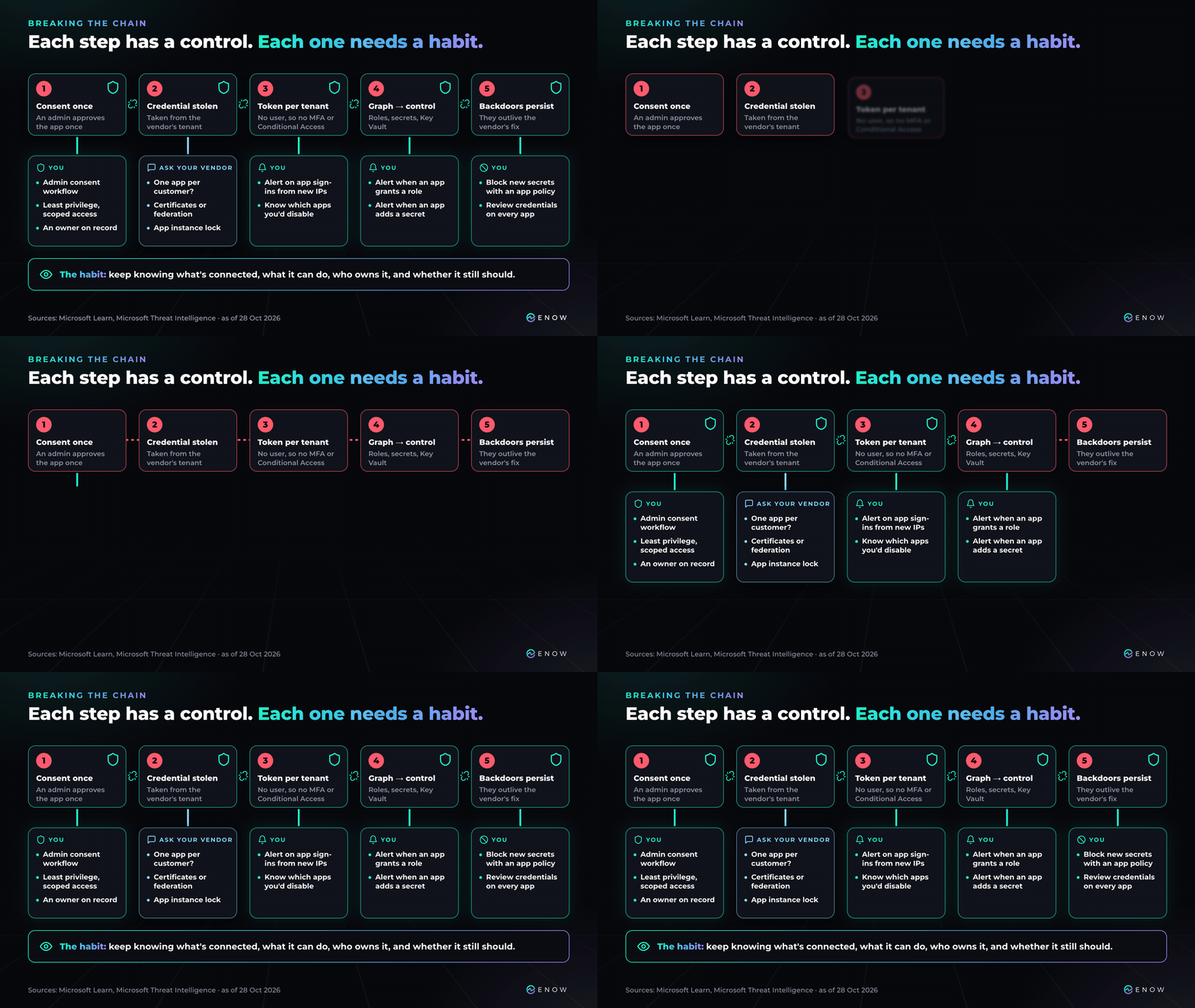
Figure 3. Each step of the attack and the control that breaks it.
Each step has a control that makes it harder or easier to see:
- Before consent: use the admin consent workflow and grant the least privilege the app can work with.
- The vendor's credential: ask for a separate app per customer, protected by a certificate or federated credential. App instance property lock is only on by default for apps created since June 2026, so ask about older apps.
- Credentials added in your tenant: an app management policy can block new secrets on every app and service principal. It can't block certificates outright, so pair it with alerts.
- Detection: alert when an app changes roles or credentials, or signs in from somewhere new. Don't hunt on the published IP alone, because Huntress traced some of the activity to Azure's private IPv6 range, which ConnectWise's own traffic also uses. Turn on Microsoft Graph activity logs now (they need Entra ID P1 or P2), since they only record from the day you enable them.
- Response: decide ahead of time which apps you'd disable in an incident, and what would stop working.
The next challenge: AI agents
This time, AI was on the attacker's side. Meanwhile, organizations are rolling out their own agents, and each one needs an identity with permissions. Microsoft Entra Agent ID uses the model this attack exploited: an agent blueprint is defined once and used to create agent identities across many tenants, much like a multitenant app. Katie Knowles has already shown how one compromised blueprint can cross tenant boundaries.
If we're struggling to govern the OAuth apps we have today, how will we govern hundreds or thousands of AI agents tomorrow?
Approving an app takes a few minutes, and the access it grants can last for years. Governing apps, and soon agents, means keeping an up-to-date view of what they can reach and who is accountable for them. When the next vendor credential leaks, that view is what lets you answer those four questions in minutes.
Free assessment
Find out how exposed your Entra apps are today
AppGov Score runs a free read-only scan of your Entra ID tenant and scores your app governance posture. For each check, you get a count and a risk score, so you can see which areas carry the most exposure. Know where you stand before the next security incident finds the gaps for you.
ENOW App Governance Accelerator
Know what a leaked credential can reach
AppGov Score tells you how much risk you’re carrying. App Governance Accelerator shows you exactly which apps carry it and keeps that inventory current across your Entra ID tenant. Without it, every incident starts with a manual hunt through app registrations and consent grants while the attacker still has access. With it, when any breach or security incident hits, your team sees right away which apps are involved and what data and systems they can reach.
Sources
Information provided is accurate as of Oct 28, 2026.
- Microsoft Threat Intelligence: analysis of Storm-0940 and ARTEX (21 Oct), and its first statement on X (@MsftSecIntel)
- Huntress: initial advisory and follow-up analysis
- ConnectWise: incident advisory
- Microsoft Learn: Conditional Access for workload identities, Microsoft Graph activity logs

Written by Merill Fernando
Creator of maester.dev and Entra.News and former Microsoft Entra Principal Product Manager. Merill Fernando is a former Principal Product Manager on the Microsoft Entra team and one of the most-followed voices in the Microsoft identity community. A developer and integrator at heart, he's behind some of the tools Entra admins reach for daily: maester.dev, cmd.ms, Graph X-Ray, and idPowerToys, his Conditional Access documenter. Through Entra.News he keeps thousands of practitioners current on everything moving across Microsoft Entra.